AL5 Programming Tutorial - PS2 & BotBoard II
| AL5 Programming Tutorial - PS2 RC Rev. 1. Updated 01/11/2012 Safety first! Wear eye protection and never touch a powered robot! The purpose of this guide is to set up the robot arm to be controlled via a Playstation 2 game controller. This can be done using a Bot Board II with Basic Atom Pro 28 with or without a SSC-32 and demonstrates both methods. Note, the PS2 control programs have been verified to work with Lynxmotion wireless controllers. We cannot guarantee that non-Lynxmotion controllers will work. What you'll need to get started:
|
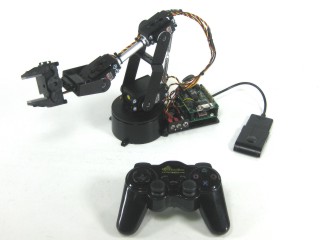 Image of arm. |
|||||||||||||||||||||||||||||||||||||||||||||||||||||||||||||||||||||||||||||||||||
| Step 1. SSC-32 and Bot BoardII/Basic Atom Pro 28 To connect the Bot Board II to the SSC-32, you will need to modify a 6" servo extender cable. Remove the header pins from the cable so you have two female ends. Then use an exacto knife to gently pry the tab up to pull the red wire free on one end. Cover the exposed female connector with heat shrink to avoid accidental shorts. Remove the TX and RX jumpers from the lower-right corner of the SSC-32, and plug the unmodified end of the cable in. Yellow on TX, red on RX, and black on ground. |
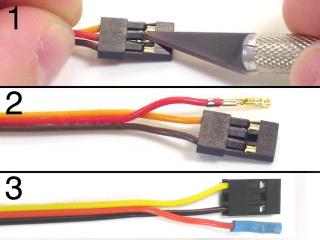 Figure 1. |
|||||||||||||||||||||||||||||||||||||||||||||||||||||||||||||||||||||||||||||||||||
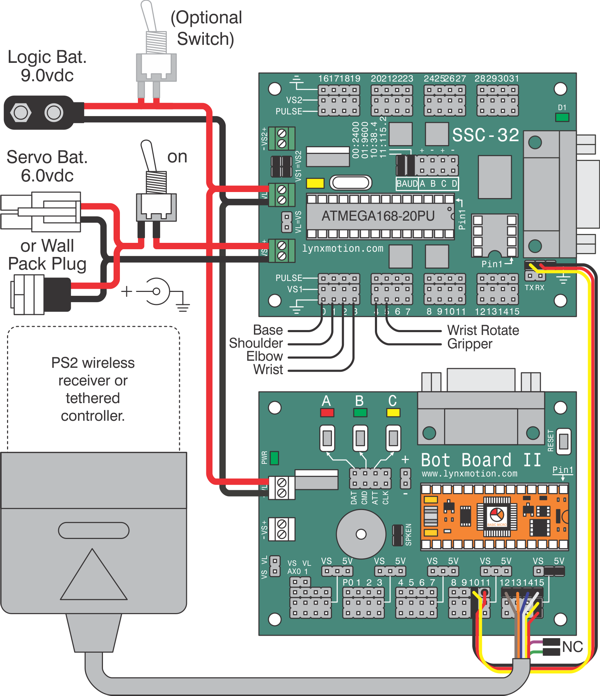
| Step 2. SSC-32 and Bot BoardII/Basic Atom Pro 28 Wire the Bot Board II and SSC-32 as shown in the schematic and tables below. Make sure the jumpers are all correct. Install the boards as shown in Figure 2 after all connections are complete and have been checked. |
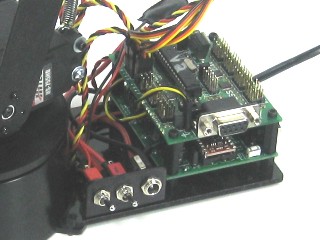 Figure 2. |
|||||||||||||||||||||||||||||||||||||||||||||||||||||||||||||||||||||||||||||||||||
| Step 3. SSC-32 and Bot BoardII/Basic Atom Pro 28 Configure the Bot Board as illustrated in Table 3-1. Configure the SSC-32 as illustrated in Table 3-2.
|
||||||||||||||||||||||||||||||||||||||||||||||||||||||||||||||||||||||||||||||||||||
| Schematic. Double check your connections against the schematic below. Note: If your cable's colors do not match the diagram, you can find a complete listing of possible colors here.
|
||||||||||||||||||||||||||||||||||||||||||||||||||||||||||||||||||||||||||||||||||||
Step 4. SSC-32 and Bot BoardII/Basic Atom Pro 28 Download and install Basic Micro Studio. Download the code for the arm here. Open the .bas file in Basic Micro Studio and locate the section referencing arm length constants. Remove the semicolons (remarks) from in front of the arm you are using. For example, if you are using an AL5D, the text should look like Table 4. The code is set to default to the AL5D arm. If you use another arm, be sure to add a semicolon before the AL5D line. Be sure that the USE_SSC-32 line is not commented out (as shown in the code snip.) When you are finished, save your program and click "Program." Please consult the serial troubleshooting guide if you have difficulties with this. |
|
|||||||||||||||||||||||||||||||||||||||||||||||||||||||||||||||||||||||||||||||||||
| Step 5. SSC-32 and Bot BoardII/Basic Atom Pro 28 Consult Table 5 for information on controlling the arm. |
|
|||||||||||||||||||||||||||||||||||||||||||||||||||||||||||||||||||||||||||||||||||
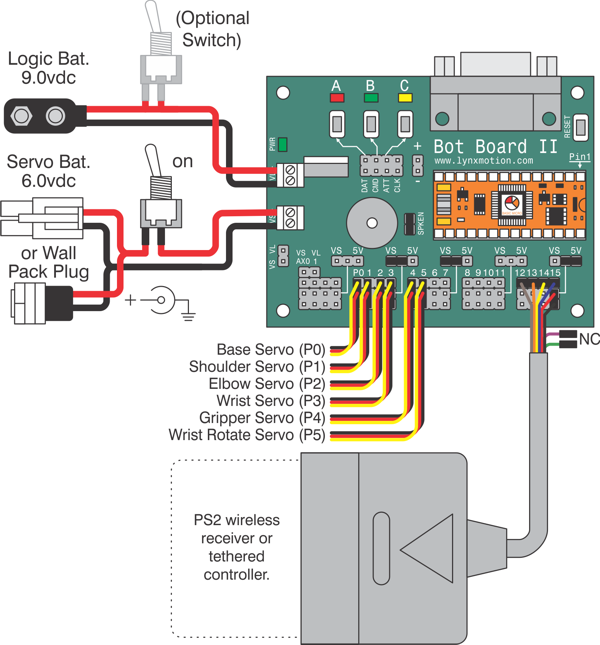
| Step 1. Bot Board II/Basic Atom Pro 28 Install the Bot Board as shown in Figure 1. Wire the Bot Board II and SSC-32 as shown in the schematic and table below. Make sure the jumpers are all correct. |
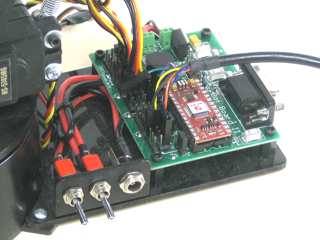 Figure 1. |
|||||||||||||||||||||||||||||||||||||||||||||||||||||||||||||||||||||||||||||||||||
| Step 2. Bot Board II/Basic Atom Pro 28 Configure the Bot Board as illustrated in Table 2. |
|
|||||||||||||||||||||||||||||||||||||||||||||||||||||||||||||||||||||||||||||||||||
| Schematic. Double check your connections against the schematic below. Note: If your cable's colors do not match the diagram, you can find a complete listing of possible colors here.
|
||||||||||||||||||||||||||||||||||||||||||||||||||||||||||||||||||||||||||||||||||||
Step 3. Bot Board II/Basic Atom Pro 28 When you are finished, save your program and click "Program." Please consult the serial troubleshooting guide if you have difficulties with this. |
|
|||||||||||||||||||||||||||||||||||||||||||||||||||||||||||||||||||||||||||||||||||
| Step 4. Bot Board II/Basic Atom Pro 28 Consult Table 4 for information on controlling the arm. |
|
|||||||||||||||||||||||||||||||||||||||||||||||||||||||||||||||||||||||||||||||||||